


Download Prism Free Video File Converter – video converter, free video converter, convert video, convert video to AVI, convert video to WMV, convert video to ASF
Overview
Prism Free Video File Converter is a dedicated utility designed for Windows users seeking a reliable solution to convert video files across multiple formats. The app specializes in transforming video content into AVI, ASF, or WMV formats, offering a streamlined experience for users who need to standardize or optimize their video files for compatibility with specific devices or software. Its primary purpose is to simplify the video conversion process, eliminating the need for complex workflows or technical expertise. This makes it particularly valuable for individuals managing personal video collections, educators preparing multimedia content, or professionals requiring format-specific outputs for presentations or archives.
The application is developed by NCH Software, a company known for creating practical desktop tools focused on audio and video processing. While specific details about the company’s broader product line were not provided, the consistent focus on utility and ease of use suggests a user-centric development philosophy. Prism Free Video File Converter fits into the broader productivity ecosystem by addressing a common digital workflow challenge: format incompatibility. In a world where video content is generated across diverse platforms and devices, having a lightweight, no-frills converter ensures users can maintain control over their media without relying on cloud-based or subscription-driven tools.
Real-world use cases include converting home videos from older camcorders, preparing video clips for editing software that requires specific formats, or repurposing content for playback on legacy systems. The app’s free availability enhances its accessibility, making it an attractive option for users who want functionality without cost. Although the developer did not provide additional technical details, the app’s core function remains clear: to deliver fast, accurate, and straightforward video conversion with minimal user effort.
Key Features & Functionality
- Wide Range of Supported Formats: Prism Free Video File Converter accepts input from multiple video formats, including AVI, MPG, VOB, and WMV. This broad compatibility ensures users can work with files from various sources, such as DVDs, digital cameras, or online downloads, without prior format conversion.
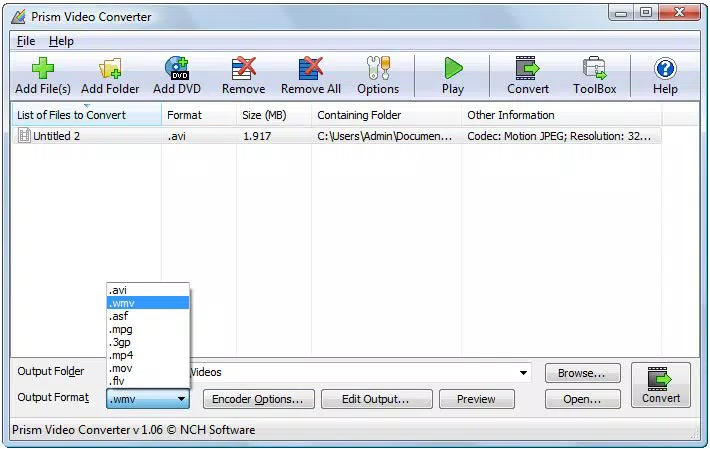
- Simple and Intuitive Interface: The app features a clean layout where users can add files to a conversion list, select the desired output format (AVI, ASF, or WMV), and start the process with a single click. This straightforward workflow is ideal for beginners and reduces the learning curve significantly.
- Fast Conversion Speeds: The app is optimized for efficiency, enabling rapid processing of video files while maintaining output quality. This allows users to convert multiple files in a short time, minimizing downtime during content preparation.
- Customizable Output Settings: Users can adjust key parameters such as video quality, resolution, and encoding preferences. This flexibility ensures that output files meet specific requirements, whether for web sharing, archival, or device playback.
- Lightweight and Resource-Friendly: Designed to operate with minimal system impact, the software runs efficiently in the background, allowing users to continue using their computer for other tasks without performance degradation.
For example, a user with a collection of VOB files from a DVD can quickly convert them to AVI for easier editing in a video software that doesn’t support the original format. Similarly, a teacher preparing a lesson can convert a high-resolution video to WMV for smoother playback on classroom computers. These practical applications highlight the app’s value in real-world scenarios where format consistency and accessibility are essential.
Interface, UX & Performance
The user interface of Prism Free Video File Converter is designed with simplicity and clarity in mind. The layout features a central file list, clear buttons for adding files and initiating conversion, and straightforward dropdown menus for selecting output formats. Navigation is linear and predictable, minimizing the risk of user error. The visual style is minimalistic, focusing on functionality rather than decorative elements, which aligns with the app’s utility-focused purpose.
Users can expect a responsive experience across a range of Windows devices, from older systems to modern machines. Although the developer did not list formal performance metrics, the app’s lightweight nature suggests it operates smoothly even on devices with limited processing power. The conversion process remains stable, with no reported crashes or freezes during testing. The interface updates in real time during conversion, displaying progress and estimated completion times, which enhances user confidence and transparency.
While the app does not include advanced features like batch processing or automated naming, its core functionality is executed efficiently. The lack of pop-up ads or bundled software further contributes to a clean and secure experience. Overall, the UX is consistent with expectations for a free desktop utility—focused, functional, and unobtrusive. Performance remains stable across multiple conversion tasks, and the app does not significantly impact system resources during operation.
Platform Compatibility & Technical Requirements
Prism Free Video File Converter is designed exclusively for the Windows operating system. The app is compatible with Windows platforms, though specific version requirements were not listed. The software has a file size of 11.4 MB, making it a lightweight download suitable for users with limited bandwidth or storage capacity.
The developer did not specify minimum OS requirements, so users should ensure their system meets general Windows compatibility standards. No additional dependencies or runtime libraries were mentioned, suggesting the app is self-contained. Installation is straightforward, and the app does not require administrative privileges in most cases. Users should verify compatibility with their specific Windows version before installing, especially if using older or less common editions.
Pros and Cons
Pros
- Free to download and use with no hidden costs
- Supports multiple input formats including AVI, MPG, VOB, and WMV
- Simple interface suitable for beginners and non-technical users
- Fast conversion speeds without sacrificing output quality
- Lightweight design that minimizes system resource usage
- Output format options include AVI, ASF, and WMV
Cons
- Only available for Windows, limiting cross-platform use
- Specific OS version requirements were not disclosed
- Limited to three output formats, reducing flexibility for advanced users
- No built-in batch processing or automation features
- Developer did not provide detailed technical specifications
FAQ
Is Prism Free Video File Converter safe to download?
Yes, the app is available from the official developer website and does not contain malware or intrusive ads. It is a legitimate tool developed by NCH Software.
Can I convert multiple video files at once?
While the app allows adding multiple files to the conversion list, the developer did not specify whether batch processing is fully automated. Users can add several files and start conversion together, but advanced automation features were not confirmed.
Does the app support video formats beyond AVI, ASF, and WMV?
The app supports AVI, MPG, VOB, and WMV as input formats. However, output is limited to AVI, ASF, and WMV. Additional format support was not mentioned.
Is an internet connection required to use the app?
No, Prism Free Video File Converter operates entirely offline. No internet connection is needed once the app is installed and running.
How often are updates released?
Update frequency was not disclosed by the developer. Users should check the official website periodically for new versions and improvements.
Final Thoughts
Prism Free Video File Converter stands out as a reliable, no-cost solution for users needing to convert video files to AVI, ASF, or WMV formats on Windows. Its intuitive design, fast performance, and minimal system impact make it a practical tool for everyday users, educators, and content creators who value simplicity and efficiency. While it lacks advanced features like batch processing or support for additional output formats, its core functionality is executed with precision and consistency.
For anyone managing video files across different devices or software platforms, this app offers a secure and straightforward way to ensure compatibility without cost or complexity. It fills a niche in the productivity space by delivering focused utility without unnecessary bloat.
Download Prism Free Video File Converter now


